Ivanti integration
About Ivanti
Ivanti Neurons is a enterprise scale ITSM system, primarily designed to manage IT services.
Prerequisites
The Ivanti REST API endpoint must be accessible from the public Internet and the server must have a valid SSL certificate.
Configuring an Ivanti destination
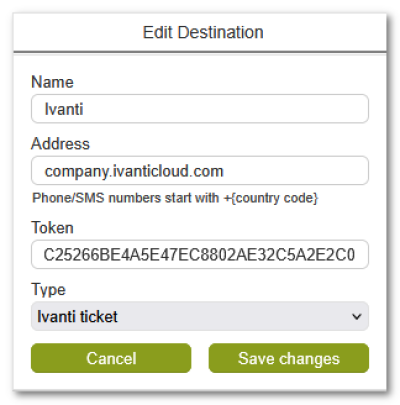
In the Address field, enter only the Ivanti API domain name, without protocol prefix or trailing slashes.
In the Token field, enter the Ivanti API access token (32 characters)
Setting up ezeio alarms for Ivanti
The ezeio supports three (3) types of Ivanti actions:
- Creating a new ticket
- Updating an open ticket (journal entry)
- Adding a resolution to an open ticket
Note that the ezeio does not automatically change the ticket status to closed when adding a resolution.
When an Ivanti message is sent in an Alarm Action, and there is no open ticket for this alarm, a new ticket is opened.
If the message is sent in a Restore Action, the Resolution field is populated and the ticket is closed in the ezeio system, but remains open in Ivanti.
If the message is sent as the result of an Alarm or Restore action of an alarm that has a parent reference, the message is added to the existing ticket as a Journal entry.
Template notes
The default alarm template for Ivanti tickets looks like this:
@I:[EZENAME1]     // This is the site ID, extracted from the first part of the ezeio name
@T:mec            // The 'AlarmType' field
@O:ITL            // The 'Source' field
@S:Open           // The 'Status' field
[ACTIONMESSAGE]